

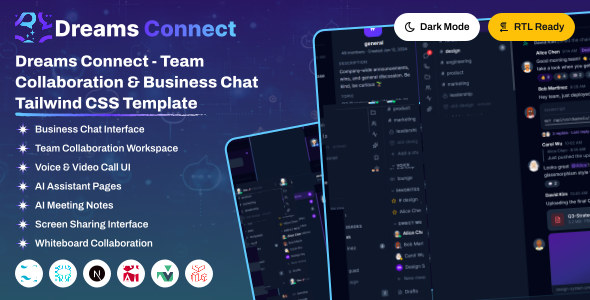
Dreams Connect is a modern, responsive social networking dashboard template built with tailwind and designed to create engaging online communities. It includes beautifully crafted pages, feeds, messaging, groups, events, notifications, and community management. Dreams Connect helps you build scalable social networking, community, and collaboration platforms with ease.
Dreams Connect offers 3 powerful dashboard variations and 10+ fully functional, prebuilt application modules with a clean, modular structure.
Prebuilt Applications
- User Profiles & Social Feeds
- Real-Time Chat & Group Conversations
- Communities, Groups & Events
- Friend Requests, Notifications & Activity Feed
- Media Sharing, User Management
Layout & Mode Features
- Multiple Sidebar Layout Options
- Full responsive design (Mobile, Tablet, Desktop)
- Built-in Light / Dark Mode Toggle
- Full RTL Layout Direction Support
- Layout Direction Variations
Project Overview
The template is organized cleanly. Here is the structure of the project files you'll see in the main directory:
dreamsconnect/
  ├── dist/                - Production build output (compiled HTML, CSS, JS, and vendor libs)
  ├── plugins/             - Custom build-time plugins (e.g. file inclusions)
  ├── src/                 - Source files directory
  │   ├── index.html       - Main page (dashboard)
  │   ├── (other HTML)     - Module pages (.html pages, etc.)
  │   ├── partials/        - Shared HTML segments (header, topbar, sidebar)
  │   └── assets/          - Asset files directory
  │       ├── css/         - Global and components styling (style.css)
  │       ├── img/         - Images, icons, and logos
  │       ├── js/          - JavaScript scripts (theme script, dashboard charts, page actions)
  │       └── libs/        - Vendor library dependencies copied on postinstall
  ├── package.json         - NPM packages and scripts
  ├── vite.config.js       - Vite bundler and development configuration
  ├── postcss.config.js    - CSS post-processing configuration
  └── yarn.lock            - Lockfile for dependencies
Structure Overview
Dreams Connect leverages the Tailwind CSS v4 framework to deliver a scalable and mobile-first user experience. The pages use shared template partials to keep the markup clean and maintainable.
A typical HTML page imports common layouts from the src/partials/ folder: title-meta.html, header.html, workspace-rail.html, and script.html.
Below is the standard page markup structure:
<!DOCTYPE html>
<html lang="en">
<head>
    @@include('partials/title-meta.html', {"title": "Dashboard"})
    @@include('partials/header.html', {"page": "index"})
</head>
<body>
    <!-- Main Content Container Wrapper -->
    <div>
        @@include('partials/workspace-rail.html')

        <!-- Page Wrapper: Contains Main Content and Footer -->
        <div >
            <main>
                <div>
                    <!-- Page modules content goes here -->
                </div>
            </main>
        </div>
    </div>

    @@include('partials/script.html', {"page": "index"})
</body>
</html>Script Loading Overview
Dreams Connect scripts are structured to load efficiently. Core scripts are loaded globally, while page-specific scripts are called directly when needed.
1. Core Theme Scripts
All core dynamics and theme actions are handled by the main script file, included in src/partials/script.html:
<script type="module" src="assets/js/script.js"></script>2. Direct Script Calling (Page-Specific)
For page-specific libraries, custom plugins, or charts (such as Apex Charts, ECharts, Chart JS, GLightbox, and DataTables), scripts are called directly in src/partials/script.html by specifying their paths.
Prerequisites
Before setting up the project, make sure you have the following environments installed on your machine:
- Node.js: Version 18.0 or higher. Download it from nodejs.org.
- Package Manager: You can use either NPM (installed with Node) or Yarn. Install Yarn globally with
npm install -g yarnif needed. - Vite: The build tool is configured locally inside the template. No global installation is needed.
Installation Steps
Extract & Open Project
Extract the downloaded Dreams Connect package file, then open the project folder in your terminal or visual code editor (e.g. VS Code).
Install Dependencies
npm install # OR yarn installThis command downloads all libraries listed in your package.json file into a newly created node_modules/ folder. It also copies required assets to the libs folder automatically.
Start Development Server
npm run dev # OR yarn run devStarts the Vite dev server. It watches for changes in any HTML, CSS, or JS file and hot-reloads the page in your browser immediately.
Open in Browser
Open your browser and visit the local address outputted in the terminal (usually http://localhost:3000).
Production Build
When you are ready to prepare files for production, run the build command to generate a minified, compiled, and optimized folder named dist/:
npm run build # OR yarn run buildDeployment
Deploy all files located inside the dist/ folder directly onto your web server. The build output includes minified scripts, compiled Tailwind CSS, and optimized layout files, ready for production use.
You can easily update the logo in two ways:
Option 1: Overwrite Logo Image Files (Recommended)
Directly replace the default SVG logo files in the src/assets/img/ directory with your own logos using the same file names:
logo.svg: Main logo (shown in light mode).
Option 2: Update HTML Templates
If you want to use different names or paths, open the template partial files: src/partials/workspace-rail.html, and search for the logo tags to modify their src attribute:
Sidebar Logo Structure (workspace-rail.html):
<a href="index.html" class="logo logo-normal">
    <img src="assets/img/logo.svg" alt="Logo">
</a>All theme colors are defined as design tokens under the @theme directive in your src/assets/css/style.css file. These variables control the look and feel of components:
@theme {
     --color-violet-50: oklch(98.7% .022 95.277);
    --color-violet-200: oklch(92.4% .12 95.746);
    --color-violet-400: oklch(82.8% .189 84.429);
}How it Works
Theme switching works by adding or toggling the class="dark" attribute on the root <html> element. The template automatically stores the user's theme selection in their session storage.
1. Attribute Control
To enable dark mode, set the attribute on the root tag:
<html class="dark">2. Tailwind CSS v4 Integration
In style.css, dark mode uses a custom variant that links the Tailwind dark: modifiers directly to the HTML attribute:
@custom-variant dark (&:where([data-theme="dark"], [data-theme="dark"] *));You can write responsive layouts by simply adding prefix variants to any tag like dark:bg-dark-900 or dark:text-white.
Dreams Connect supports full Right-to-Left (RTL) reading directions. To change the layout from Left-to-Right (LTR) to RTL:
1. Update the HTML Tag
Simply add the dir="rtl" attribute and appropriate language code to your root tag:
<html lang="ar" dir="rtl">2. Tailwind RTL Processing
Tailwind CSS automatically transforms positioning utilities (like margins, padding, and flex alignments) using standard logical properties when the dir="rtl" attribute is active.
Dreams Connect is developed by Dreams Technologies and is available under both Envato Extended & Regular License options.
Regular License
Usage by either yourself or a single client is permitted for a single end product, provided that end users are not subject to any charges.
Extended License
For use by you or one client in a single end product for which end users may be charged.
What are the main differences between the Regular License and the Extended License?
If you operate as a freelancer or agency, you have the option to acquire the Extended License, which permits you to utilize the item across multiple projects on behalf of your clients.
Dreams Connect is built upon several open-source libraries, frameworks, and typography assets. We appreciate the contribution of the following resources:
| Asset Name | Official Website URL |
|---|---|
| Tailwind CSS | https://tailwindcss.com/ |
| Vite JS | https://vite.dev/ |
| Lucide Icons | https://lucide.dev/ |
If you have any questions or run into issues with the template, feel free to contact us via email at support@dreamstechnologies.com.
Response Time: Typically 12–24 hours on weekdays (GMT+5:30). Support covers template bugs, errors, and standard features. It does not cover custom installations or custom coding changes.
Contact SupportDo you need custom development for your application?
If you need customization, new page integration, feature setups, or database connections, our engineering team can help tailor this template to your precise specifications.
- Tailoring features to your exact branding and workflow.
- Deploying the template to your production servers.
- Integrating backend endpoints and databases.

Thank You
Thank you for choosing **Dreams Connect**! We hope this template facilitates building your application. We kindly ask you to share your feedback by leaving a rating on ThemeForest.
Leave a Review